
利用這個示範,可以套用很多的想法及上課遊戲
1.在工具中選擇Canvas
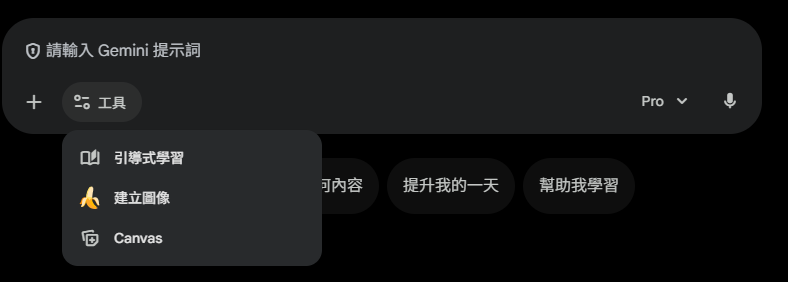
2.提示詞輸入以下:
請幫我設計一個帕斯卡原理的遊戲, 用於跟小朋友說明其運作方式, 設計概念可以包括以下元素:
- 遊戲目標: 讓小朋友理解帕斯卡原理的基本概念, 即「容器內的壓力均勻作用在容器的所有部分」。
- 遊戲場景: 設計成一個有容器和液體的場景, 例如兩個連通的容器, 每個容器中裝有水。
- 互動要素: 可以透過操作調整容器的形狀或大小, 觀察液體的移動和壓力分佈。
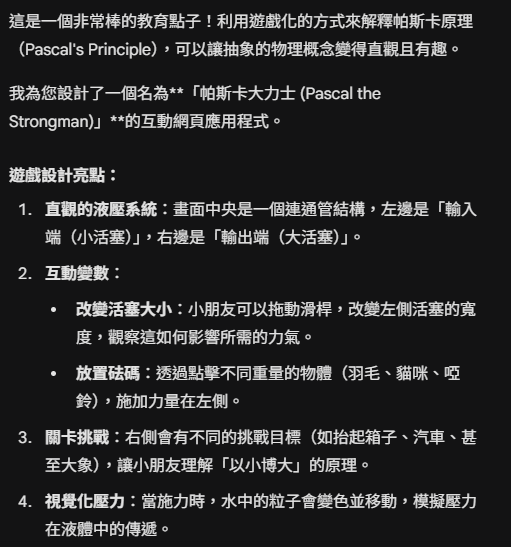
3.設計說明與使用指南
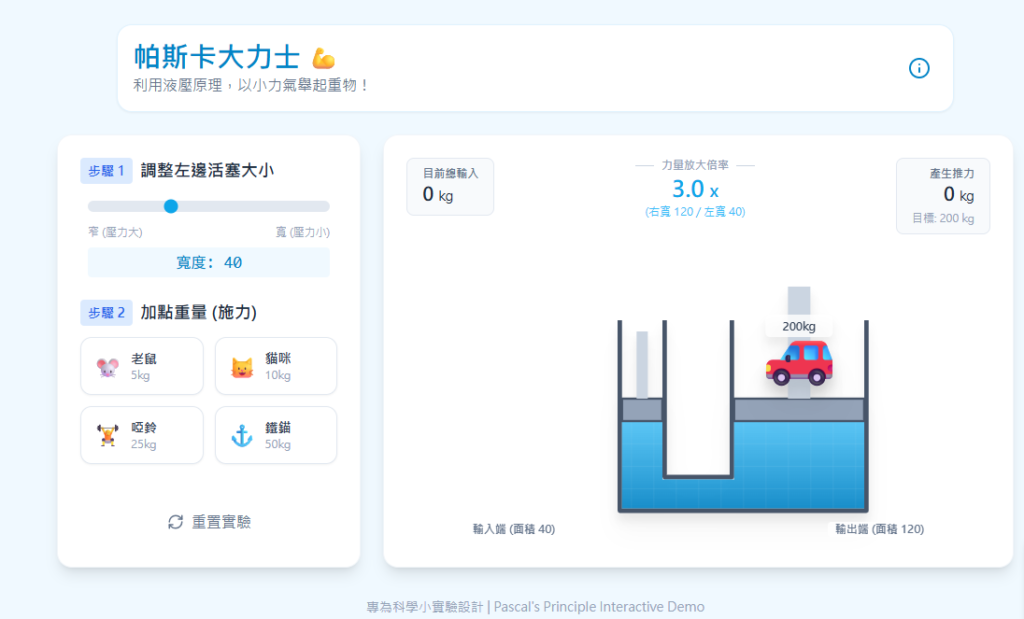
這個設計「帕斯卡大力士」透過直觀的視覺反饋,幫助小朋友理解以下物理概念:
- 容器內的連通性:
- 場景中央是一個 U 型連通管,小朋友可以清楚看到兩邊的水是連在一起的。
- 當左邊被壓下時,右邊就會上升,這建立了「液體傳遞壓力」的基本直覺。
- 以小博大(力的放大):
- 核心機制:小朋友不需要計算公式。他們只需要發現,當把左邊的活塞變窄(縮小面積 $A_1$)時,中間的「力量放大倍率」就會變大。
- 視覺化數據:畫面上方清楚顯示了
倍率 X。例如,如果右邊活塞是左邊的 4 倍大,小朋友只需要放 50kg 的東西,就能舉起 200kg 的汽車。
- 互動流程:
- Step 1:調整左邊活塞的寬度(越窄,推力越強,但需要壓得越深,雖然遊戲中為了簡化視覺,主要強調推力)。
- Step 2:點擊下方的「老鼠」、「貓咪」等圖示,將它們堆疊在左邊活塞上。
- Step 3:觀察結果。如果力量足夠,右邊的重物(箱子、汽車、大象)就會被舉起來,並伴隨慶祝動畫。
4.給家長/老師的引導建議:
問問題:「為什麼老鼠那麼輕,卻能舉起大象?」引導小朋友看上面的「倍率」數字。
觀察:「當我們把左邊的管子變細的時候,是要放更多東西還是更少東西才能舉起來?」
生活應用:玩完遊戲後,可以告訴小朋友,這就是為什麼修車廠的機器可以把車子抬起來,或者為什麼踩煞車可以讓高速的車子停下來的原因。
5.遊戲開始畫面
6.遊戲完成畫面:

7.程式碼如下:
import React, { useState, useEffect, useRef } from 'react';
import { Settings, Info, RefreshCw, ChevronRight, Trophy } from 'lucide-react';
// Tailwind is assumed to be available in the environment
const PascalGame = () => {
// --- Game State ---
const [leftPistonWidth, setLeftPistonWidth] = useState(40); // Width in px (visual representation)
const rightPistonWidth = 120; // Fixed large output piston
const [inputWeights, setInputWeights] = useState([]);
const [targetObject, setTargetObject] = useState('box'); // box, car, elephant
const [isLifting, setIsLifting] = useState(false);
const [liftHeight, setLiftHeight] = useState(0); // 0 to 100%
const [showConfetti, setShowConfetti] = useState(false);
const [showInfo, setShowInfo] = useState(false);
// --- Constants & Physics Logic ---
const TARGETS = {
box: { id: 'box', name: '沉重的箱子', weight: 50, emoji: '📦', color: 'bg-amber-600' },
car: { id: 'car', name: '小汽車', weight: 200, emoji: '🚗', color: 'bg-red-500' },
elephant: { id: 'elephant', name: '大象', weight: 1000, emoji: '🐘', color: 'bg-slate-400' },
};
const INPUT_ITEMS = [
{ id: 'mouse', name: '老鼠', weight: 5, emoji: '🐭' },
{ id: 'cat', name: '貓咪', weight: 10, emoji: '🐱' },
{ id: 'dumbbell', name: '啞鈴', weight: 25, emoji: '🏋️' },
{ id: 'anchor', name: '鐵錨', weight: 50, emoji: '⚓' },
];
// Calculate physics
// Area ~ Width (simplification for 2D visualization, though technically Area = pi*r^2)
// To make it intuitive for 2D, we'll treat Width as Area
const areaRatio = rightPistonWidth / leftPistonWidth;
const totalInputWeight = inputWeights.reduce((sum, item) => sum + item.weight, 0);
const outputForce = totalInputWeight * areaRatio;
const targetWeight = TARGETS[targetObject].weight;
// Success condition: Output Force >= Target Weight
const isSuccess = outputForce >= targetWeight;
useEffect(() => {
if (isSuccess && inputWeights.length > 0) {
// Animate lifting
setIsLifting(true);
const timer = setTimeout(() => {
setLiftHeight(100);
setShowConfetti(true);
}, 100);
return () => clearTimeout(timer);
} else {
// Reset if weight is removed or ratio changes to fail
setIsLifting(false);
setLiftHeight(0);
setShowConfetti(false);
}
}, [outputForce, targetWeight, inputWeights.length]);
// --- Handlers ---
const addWeight = (item) => {
if (isSuccess) return; // Can't add more if already lifted
setInputWeights([...inputWeights, item]);
};
const clearWeights = () => {
setInputWeights([]);
setShowConfetti(false);
setLiftHeight(0);
};
const nextLevel = () => {
clearWeights();
if (targetObject === 'box') setTargetObject('car');
else if (targetObject === 'car') setTargetObject('elephant');
else setTargetObject('box'); // Loop back
};
// --- Visual Rendering Helpers ---
// Visualize pressure particles
const particles = Array.from({ length: 20 }).map((_, i) => ({
x: Math.random() * 280 + 10,
y: Math.random() * 80 + 110,
delay: Math.random() * 2,
}));
return (
<div className="min-h-screen bg-sky-50 font-sans text-slate-800 p-4 md:p-8 flex flex-col items-center">
{/* Header */}
<header className="w-full max-w-4xl flex justify-between items-center mb-6 bg-white p-4 rounded-2xl shadow-sm border border-sky-100">
<div>
<h1 className="text-2xl md:text-3xl font-bold text-sky-600 flex items-center gap-2">
帕斯卡大力士 <span className="text-2xl">💪</span>
</h1>
<p className="text-slate-500 text-sm md:text-base">利用液壓原理,以小力氣舉起重物!</p>
</div>
<button
onClick={() => setShowInfo(!showInfo)}
className="p-2 rounded-full hover:bg-sky-100 text-sky-600 transition-colors"
title="原理說明"
>
<Info size={24} />
</button>
</header>
{/* Info Modal */}
{showInfo && (
<div className="fixed inset-0 z-50 flex items-center justify-center bg-black/50 p-4" onClick={() => setShowInfo(false)}>
<div className="bg-white rounded-2xl p-6 max-w-lg shadow-xl" onClick={e => e.stopPropagation()}>
<h3 className="text-xl font-bold text-sky-700 mb-3">帕斯卡原理是什麼?</h3>
<p className="mb-3 text-slate-600">
想像水就像一群手牽手的小精靈。當你在容器的一端推擠(施加壓力)時,這股推力會<strong>均勻地傳遞到水的每一個角落</strong>。
</p>
<div className="bg-sky-50 p-3 rounded-lg mb-3 border border-sky-100">
<p className="font-semibold text-sky-800 text-center">公式: F1 / A1 = F2 / A2</p>
</div>
<p className="text-slate-600 text-sm">
如果我們讓右邊的面積 (A2) 變成左邊 (A1) 的 <strong>5倍</strong> 大,
那麼右邊產生的力量 (F2) 也會變成左邊推力 (F1) 的 <strong>5倍</strong> 大!
這就是為什麼我們可以用小小的力量舉起大象的原因。
</p>
<button
onClick={() => setShowInfo(false)}
className="mt-4 w-full bg-sky-500 hover:bg-sky-600 text-white py-2 rounded-lg font-bold transition-colors"
>
懂了,開始挑戰!
</button>
</div>
</div>
)}
<main className="w-full max-w-5xl grid grid-cols-1 lg:grid-cols-3 gap-6">
{/* Left Control Panel: Inputs */}
<div className="bg-white p-6 rounded-2xl shadow-lg border border-slate-100 flex flex-col gap-6 order-2 lg:order-1">
<div>
<h2 className="text-lg font-bold mb-3 flex items-center gap-2">
<span className="bg-blue-100 text-blue-600 px-2 py-1 rounded text-sm">步驟 1</span>
調整左邊活塞大小
</h2>
<div className="px-2">
<input
type="range"
min="20"
max="80"
step="10"
value={leftPistonWidth}
onChange={(e) => {
if (inputWeights.length === 0) setLeftPistonWidth(Number(e.target.value));
else alert("請先清空砝碼再調整大小!");
}}
className="w-full h-3 bg-slate-200 rounded-lg appearance-none cursor-pointer accent-sky-500"
disabled={inputWeights.length > 0}
/>
<div className="flex justify-between text-xs text-slate-400 mt-2">
<span>窄 (壓力大)</span>
<span>寬 (壓力小)</span>
</div>
<p className="text-center mt-2 font-mono text-sky-600 bg-sky-50 py-1 rounded">
寬度: {leftPistonWidth}
</p>
</div>
</div>
<div>
<h2 className="text-lg font-bold mb-3 flex items-center gap-2">
<span className="bg-blue-100 text-blue-600 px-2 py-1 rounded text-sm">步驟 2</span>
加點重量 (施力)
</h2>
<div className="grid grid-cols-2 gap-3">
{INPUT_ITEMS.map((item) => (
<button
key={item.id}
onClick={() => addWeight(item)}
disabled={isSuccess}
className={`flex items-center gap-2 p-3 rounded-xl border transition-all ${
isSuccess
? 'opacity-50 cursor-not-allowed bg-slate-50 border-slate-200'
: 'hover:bg-sky-50 border-slate-200 hover:border-sky-300 active:scale-95 bg-white shadow-sm'
}`}
>
<span className="text-2xl">{item.emoji}</span>
<div className="text-left leading-tight">
<div className="font-bold text-sm text-slate-700">{item.name}</div>
<div className="text-xs text-slate-400">{item.weight}kg</div>
</div>
</button>
))}
</div>
</div>
<div className="mt-auto">
<button
onClick={clearWeights}
className="w-full flex items-center justify-center gap-2 text-slate-500 hover:text-red-500 hover:bg-red-50 py-3 rounded-xl transition-colors"
>
<RefreshCw size={18} /> 重置實驗
</button>
</div>
</div>
{/* Center Stage: Visualization */}
<div className="lg:col-span-2 bg-white rounded-2xl shadow-lg border border-slate-100 p-6 relative overflow-hidden flex flex-col order-1 lg:order-2">
{/* Confetti Effect */}
{showConfetti && (
<div className="absolute inset-0 pointer-events-none z-20 flex justify-center pt-20">
<div className="animate-bounce text-6xl">✨ 成功! ✨</div>
</div>
)}
{/* Top Info Bar */}
<div className="flex justify-between items-start mb-8 z-10">
<div className="bg-slate-50 px-4 py-2 rounded-lg border border-slate-200">
<div className="text-xs text-slate-500 uppercase font-bold">目前總輸入</div>
<div className="text-xl font-bold text-slate-800">{totalInputWeight} <span className="text-sm font-normal">kg</span></div>
</div>
<div className="flex flex-col items-center">
<div className="text-xs text-slate-400 font-bold bg-white px-2 z-10">力量放大倍率</div>
<div className="h-px w-32 bg-slate-300 -mt-2 mb-2"></div>
<div className="text-2xl font-black text-sky-500">
{areaRatio.toFixed(1)} <span className="text-lg">x</span>
</div>
<div className="text-xs text-sky-400">
(右寬 {rightPistonWidth} / 左寬 {leftPistonWidth})
</div>
</div>
<div className="bg-slate-50 px-4 py-2 rounded-lg border border-slate-200 text-right">
<div className="text-xs text-slate-500 uppercase font-bold">產生推力</div>
<div className={`text-xl font-bold transition-colors ${isSuccess ? 'text-green-600' : 'text-slate-800'}`}>
{Math.floor(outputForce)} <span className="text-sm font-normal">kg</span>
</div>
<div className="text-xs text-slate-400 mt-1">
目標: {targetWeight} kg
</div>
</div>
</div>
{/* The Hydraulic Press SVG Illustration */}
<div className="flex-1 flex items-end justify-center relative min-h-[300px]">
<svg viewBox="0 0 400 250" className="w-full h-full max-h-[300px] drop-shadow-xl">
<defs>
<linearGradient id="waterGradient" x1="0%" y1="0%" x2="0%" y2="100%">
<stop offset="0%" stopColor="#38bdf8" stopOpacity="0.8" />
<stop offset="100%" stopColor="#0284c7" stopOpacity="0.9" />
</linearGradient>
<pattern id="grid" width="20" height="20" patternUnits="userSpaceOnUse">
<path d="M 20 0 L 0 0 0 20" fill="none" stroke="white" strokeWidth="0.5" opacity="0.2"/>
</pattern>
</defs>
{/* Container Walls */}
{/* Calculating coordinates based on widths */}
{(() => {
const centerX = 200;
const gap = 30; // Gap between the two cylinders
const groundY = 220;
const fluidHeight = 80;
// Left Cylinder Coords
const leftX2 = centerX - gap;
const leftX1 = leftX2 - leftPistonWidth;
// Right Cylinder Coords
const rightX1 = centerX + gap;
const rightX2 = rightX1 + rightPistonWidth;
// Piston Y positions (animated)
// If weight added (isSuccess=false initially), left pushes down a bit visually
// If success, left pushes deep, right goes up
const baseLeftY = groundY - fluidHeight;
const baseRightY = groundY - fluidHeight;
// Visual Calculation for piston movement
// We fake the physics visually to make it look good on screen
// Max depth for left piston is 50px
const pushPercent = Math.min(totalInputWeight / (targetWeight / areaRatio * 1.5), 1);
let leftDeltaY = 0;
let rightDeltaY = 0;
if (isSuccess) {
// Fully pushed down
leftDeltaY = 60; // Left goes down
rightDeltaY = -60 / areaRatio; // Right goes up based on ratio (approx visual)
// Clamp right movement for visual sanity
if (rightDeltaY > -10) rightDeltaY = -10;
if (rightDeltaY < -80) rightDeltaY = -80;
} else {
// Struggling phase
leftDeltaY = pushPercent * 20;
rightDeltaY = -(pushPercent * 20) / areaRatio;
}
const currentLeftY = baseLeftY + leftDeltaY;
const currentRightY = baseRightY + rightDeltaY;
return (
<g>
{/* Connecting Pipe */}
<path
d={`
M ${leftX1} 50 L ${leftX1} ${groundY}
L ${rightX2} ${groundY} L ${rightX2} 50
M ${leftX2} 50 L ${leftX2} ${groundY - 30}
L ${rightX1} ${groundY - 30} L ${rightX1} 50
`}
fill="none"
stroke="#475569"
strokeWidth="4"
strokeLinejoin="round"
/>
{/* Water */}
<path
d={`
M ${leftX1 + 2} ${currentLeftY}
L ${leftX1 + 2} ${groundY - 2}
L ${rightX2 - 2} ${groundY - 2}
L ${rightX2 - 2} ${currentRightY}
L ${rightX1 + 2} ${currentRightY}
L ${rightX1 + 2} ${groundY - 28}
L ${leftX2 - 2} ${groundY - 28}
L ${leftX2 - 2} ${currentLeftY}
Z
`}
fill="url(#waterGradient)"
className="transition-all duration-700 ease-out"
/>
{/* Water Grid Overlay */}
<path
d={`
M ${leftX1 + 2} ${currentLeftY}
L ${leftX1 + 2} ${groundY - 2}
L ${rightX2 - 2} ${groundY - 2}
L ${rightX2 - 2} ${currentRightY}
L ${rightX1 + 2} ${currentRightY}
L ${rightX1 + 2} ${groundY - 28}
L ${leftX2 - 2} ${groundY - 28}
L ${leftX2 - 2} ${currentLeftY}
Z
`}
fill="url(#grid)"
className="transition-all duration-700 ease-out"
/>
{/* Pressure Particles (Visual Fluff) */}
{totalInputWeight > 0 && (
<g className={isSuccess ? "animate-pulse" : ""}>
{particles.map((p, i) => (
<circle
key={i}
cx={centerX + (Math.sin(i) * 60)} // Simplified distribution
cy={groundY - 15}
r={isSuccess ? 3 : 1.5}
fill="white"
opacity="0.4"
/>
))}
{/* Arrows indicating force transfer */}
<path
d={`M ${centerX} ${groundY-20} L ${rightX1 + 20} ${groundY-20} L ${rightX1+20} ${currentRightY + 20}`}
stroke="white"
strokeWidth="2"
strokeDasharray="5,5"
opacity="0.5"
fill="none"
/>
</g>
)}
{/* Left Piston (Input) */}
<rect
x={leftX1 + 2}
y={currentLeftY - 20}
width={leftPistonWidth - 4}
height="20"
fill="#94a3b8"
stroke="#475569"
strokeWidth="2"
className="transition-all duration-700 ease-out"
/>
{/* Input Piston Rod */}
<rect
x={leftX1 + (leftPistonWidth/2) - 5}
y={currentLeftY - 80}
width="10"
height="60"
fill="#cbd5e1"
/>
{/* Visual Weights Stack on Left Piston */}
<g transform={`translate(${leftX1 + (leftPistonWidth/2)}, ${currentLeftY - 20})`} className="transition-all duration-700 ease-out">
{inputWeights.map((item, index) => (
<text
key={index}
x="0"
y={-(index * 25) - 5}
textAnchor="middle"
fontSize="20"
className="drop-shadow-md"
>
{item.emoji}
</text>
))}
</g>
{/* Right Piston (Output) */}
<rect
x={rightX1 + 2}
y={currentRightY - 20}
width={rightPistonWidth - 4}
height="20"
fill="#94a3b8"
stroke="#475569"
strokeWidth="2"
className="transition-all duration-700 ease-out"
/>
{/* Output Piston Rod */}
<rect
x={rightX1 + (rightPistonWidth/2) - 10}
y={currentRightY - 20}
width="20"
height={100} // Extends down into liquid visually to hide gap if needed, or just standard rod up
fill="#cbd5e1"
transform={`translate(0, -100)`}
/>
{/* Target Object on Right Piston */}
<g
transform={`translate(${rightX1 + (rightPistonWidth/2)}, ${currentRightY - 25})`}
className="transition-all duration-700 ease-out"
>
<g transform={`scale(${ targetObject === 'elephant' ? 1.5 : targetObject === 'car' ? 1.2 : 1})`}>
<text
x="0"
y="-10"
textAnchor="middle"
fontSize="50"
className="drop-shadow-xl"
>
{TARGETS[targetObject].emoji}
</text>
</g>
{/* Weight Label */}
<rect x="-30" y="-70" width="60" height="20" rx="4" fill="white" opacity="0.8" />
<text x="0" y="-56" textAnchor="middle" fontSize="10" fontWeight="bold" fill="#334155">{TARGETS[targetObject].weight}kg</text>
</g>
</g>
);
})()}
</svg>
{/* Labels overlay */}
<div className="absolute bottom-2 left-[10%] text-xs text-slate-500 font-bold bg-white/80 px-2 rounded backdrop-blur-sm">
輸入端 (面積 {leftPistonWidth})
</div>
<div className="absolute bottom-2 right-[10%] text-xs text-slate-500 font-bold bg-white/80 px-2 rounded backdrop-blur-sm">
輸出端 (面積 {rightPistonWidth})
</div>
</div>
{/* Level Complete Overlay */}
{isSuccess && (
<div className="absolute inset-0 bg-white/60 backdrop-blur-[2px] flex flex-col items-center justify-center z-30 animate-in fade-in duration-500">
<Trophy className="text-yellow-500 w-16 h-16 mb-2 animate-bounce" />
<h2 className="text-3xl font-black text-slate-800 mb-2">成功舉起!</h2>
<p className="text-slate-600 mb-6">你利用帕斯卡原理,用 {totalInputWeight}kg 舉起了 {targetWeight}kg!</p>
<button
onClick={nextLevel}
className="bg-sky-500 hover:bg-sky-600 text-white px-8 py-3 rounded-full font-bold shadow-lg flex items-center gap-2 transform transition-transform hover:scale-105"
>
挑戰下一關 <ChevronRight />
</button>
</div>
)}
</div>
</main>
<footer className="mt-8 text-center text-slate-400 text-sm">
專為科學小實驗設計 | Pascal's Principle Interactive Demo
</footer>
</div>
);
};
export default PascalGame;關於此程式碼
這個遊戲是使用 React 框架編寫的。為了讓您能最方便地使用,我們提供了「懶人包 HTML」方法,這是最簡單的方式。
方法一:直接使用懶人包 HTML (最推薦 ⭐)
適用對象:不想設定任何環境,只想打開檔案就玩的人。
- 複製檔案:將下方程式碼的內容全部複製。
- 存檔:在您的電腦上新建一個文字文件,貼上內容,並將檔名存為
game.html(注意副檔名要是 .html)。 - 執行:直接點兩下這個檔案,它就會在瀏覽器中開啟,且樣式完全正常。
<!DOCTYPE html>
<html lang="zh-TW">
<head>
<meta charset="UTF-8">
<meta name="viewport" content="width=device-width, initial-scale=1.0">
<title>帕斯卡大力士 - Pascal's Principle Game</title>
<!-- 1. 載入 Tailwind CSS (處理樣式) -->
<script src="https://cdn.tailwindcss.com"></script>
<!-- 2. 載入 React 核心 (處理邏輯) -->
<script src="https://unpkg.com/react@18/umd/react.development.js" crossorigin></script>
<script src="https://unpkg.com/react-dom@18/umd/react-dom.development.js" crossorigin></script>
<!-- 3. 載入 Babel (讓瀏覽器看懂 React 語法) -->
<script src="https://unpkg.com/@babel/standalone/babel.min.js"></script>
<style>
/* 額外修正一些在純 HTML 模式下的顯示問題 */
body { background-color: #f0f9ff; }
</style>
</head>
<body>
<div id="root"></div>
<script type="text/babel">
const { useState, useEffect } = React;
// --- 圖示元件 (取代 lucide-react 依賴,確保單檔可執行) ---
const Info = ({ size = 24, className = "" }) => (
<svg width={size} height={size} viewBox="0 0 24 24" fill="none" stroke="currentColor" strokeWidth="2" strokeLinecap="round" strokeLinejoin="round" className={className}><circle cx="12" cy="12" r="10"/><path d="M12 16v-4"/><path d="M12 8h.01"/></svg>
);
const RefreshCw = ({ size = 24, className = "" }) => (
<svg width={size} height={size} viewBox="0 0 24 24" fill="none" stroke="currentColor" strokeWidth="2" strokeLinecap="round" strokeLinejoin="round" className={className}><path d="M3 12a9 9 0 0 1 9-9 9.75 9.75 0 0 1 6.74 2.74L21 8"/><path d="M21 3v5h-5"/><path d="M21 12a9 9 0 0 1-9 9 9.75 9.75 0 0 1-6.74-2.74L3 16"/><path d="M8 16H3v5"/></svg>
);
const ChevronRight = ({ size = 24, className = "" }) => (
<svg width={size} height={size} viewBox="0 0 24 24" fill="none" stroke="currentColor" strokeWidth="2" strokeLinecap="round" strokeLinejoin="round" className={className}><path d="m9 18 6-6-6-6"/></svg>
);
const Trophy = ({ size = 24, className = "" }) => (
<svg width={size} height={size} viewBox="0 0 24 24" fill="none" stroke="currentColor" strokeWidth="2" strokeLinecap="round" strokeLinejoin="round" className={className}><path d="M6 9H4.5a2.5 2.5 0 0 1 0-5H6"/><path d="M18 9h1.5a2.5 2.5 0 0 0 0-5H18"/><path d="M4 22h16"/><path d="M10 14.66V17c0 .55-.47.98-.97 1.21C7.85 18.75 7 20.24 7 22"/><path d="M14 14.66V17c0 .55.47.98.97 1.21C16.15 18.75 17 20.24 17 22"/><path d="M18 2H6v7a6 6 0 0 0 12 0V2Z"/></svg>
);
// --- 主遊戲程式 ---
const PascalGame = () => {
// --- Game State ---
const [leftPistonWidth, setLeftPistonWidth] = useState(40); // Width in px
const rightPistonWidth = 120; // Fixed large output piston
const [inputWeights, setInputWeights] = useState([]);
const [targetObject, setTargetObject] = useState('box'); // box, car, elephant
const [isLifting, setIsLifting] = useState(false);
const [liftHeight, setLiftHeight] = useState(0);
const [showConfetti, setShowConfetti] = useState(false);
const [showInfo, setShowInfo] = useState(false);
// --- Constants & Physics Logic ---
const TARGETS = {
box: { id: 'box', name: '沉重的箱子', weight: 50, emoji: '📦', color: 'bg-amber-600' },
car: { id: 'car', name: '小汽車', weight: 200, emoji: '🚗', color: 'bg-red-500' },
elephant: { id: 'elephant', name: '大象', weight: 1000, emoji: '🐘', color: 'bg-slate-400' },
};
const INPUT_ITEMS = [
{ id: 'mouse', name: '老鼠', weight: 5, emoji: '🐭' },
{ id: 'cat', name: '貓咪', weight: 10, emoji: '🐱' },
{ id: 'dumbbell', name: '啞鈴', weight: 25, emoji: '🏋️' },
{ id: 'anchor', name: '鐵錨', weight: 50, emoji: '⚓' },
];
// Calculate physics
const areaRatio = rightPistonWidth / leftPistonWidth;
const totalInputWeight = inputWeights.reduce((sum, item) => sum + item.weight, 0);
const outputForce = totalInputWeight * areaRatio;
const targetWeight = TARGETS[targetObject].weight;
const isSuccess = outputForce >= targetWeight;
useEffect(() => {
if (isSuccess && inputWeights.length > 0) {
setIsLifting(true);
const timer = setTimeout(() => {
setLiftHeight(100);
setShowConfetti(true);
}, 100);
return () => clearTimeout(timer);
} else {
setIsLifting(false);
setLiftHeight(0);
setShowConfetti(false);
}
}, [outputForce, targetWeight, inputWeights.length]);
// --- Handlers ---
const addWeight = (item) => {
if (isSuccess) return;
setInputWeights([...inputWeights, item]);
};
const clearWeights = () => {
setInputWeights([]);
setShowConfetti(false);
setLiftHeight(0);
};
const nextLevel = () => {
clearWeights();
if (targetObject === 'box') setTargetObject('car');
else if (targetObject === 'car') setTargetObject('elephant');
else setTargetObject('box');
};
const particles = Array.from({ length: 20 }).map((_, i) => ({
x: Math.random() * 280 + 10,
y: Math.random() * 80 + 110,
delay: Math.random() * 2,
}));
return (
<div className="min-h-screen bg-sky-50 font-sans text-slate-800 p-4 md:p-8 flex flex-col items-center">
{/* Header */}
<header className="w-full max-w-4xl flex justify-between items-center mb-6 bg-white p-4 rounded-2xl shadow-sm border border-sky-100">
<div>
<h1 className="text-2xl md:text-3xl font-bold text-sky-600 flex items-center gap-2">
帕斯卡大力士 <span className="text-2xl">💪</span>
</h1>
<p className="text-slate-500 text-sm md:text-base">利用液壓原理,以小力氣舉起重物!</p>
</div>
<button
onClick={() => setShowInfo(!showInfo)}
className="p-2 rounded-full hover:bg-sky-100 text-sky-600 transition-colors"
title="原理說明"
>
<Info size={24} />
</button>
</header>
{/* Info Modal */}
{showInfo && (
<div className="fixed inset-0 z-50 flex items-center justify-center bg-black/50 p-4" onClick={() => setShowInfo(false)}>
<div className="bg-white rounded-2xl p-6 max-w-lg shadow-xl" onClick={e => e.stopPropagation()}>
<h3 className="text-xl font-bold text-sky-700 mb-3">帕斯卡原理是什麼?</h3>
<p className="mb-3 text-slate-600">
想像水就像一群手牽手的小精靈。當你在容器的一端推擠(施加壓力)時,這股推力會<strong>均勻地傳遞到水的每一個角落</strong>。
</p>
<div className="bg-sky-50 p-3 rounded-lg mb-3 border border-sky-100">
<p className="font-semibold text-sky-800 text-center">公式: F1 / A1 = F2 / A2</p>
</div>
<p className="text-slate-600 text-sm">
如果我們讓右邊的面積 (A2) 變成左邊 (A1) 的 <strong>5倍</strong> 大,
那麼右邊產生的力量 (F2) 也會變成左邊推力 (F1) 的 <strong>5倍</strong> 大!
這就是為什麼我們可以用小小的力量舉起大象的原因。
</p>
<button
onClick={() => setShowInfo(false)}
className="mt-4 w-full bg-sky-500 hover:bg-sky-600 text-white py-2 rounded-lg font-bold transition-colors"
>
懂了,開始挑戰!
</button>
</div>
</div>
)}
<main className="w-full max-w-5xl grid grid-cols-1 lg:grid-cols-3 gap-6">
{/* Left Control Panel: Inputs */}
<div className="bg-white p-6 rounded-2xl shadow-lg border border-slate-100 flex flex-col gap-6 order-2 lg:order-1">
<div>
<h2 className="text-lg font-bold mb-3 flex items-center gap-2">
<span className="bg-blue-100 text-blue-600 px-2 py-1 rounded text-sm">步驟 1</span>
調整左邊活塞大小
</h2>
<div className="px-2">
<input
type="range"
min="20"
max="80"
step="10"
value={leftPistonWidth}
onChange={(e) => {
if (inputWeights.length === 0) setLeftPistonWidth(Number(e.target.value));
else alert("請先清空砝碼再調整大小!");
}}
className="w-full h-3 bg-slate-200 rounded-lg appearance-none cursor-pointer accent-sky-500"
disabled={inputWeights.length > 0}
/>
<div className="flex justify-between text-xs text-slate-400 mt-2">
<span>窄 (壓力大)</span>
<span>寬 (壓力小)</span>
</div>
<p className="text-center mt-2 font-mono text-sky-600 bg-sky-50 py-1 rounded">
寬度: {leftPistonWidth}
</p>
</div>
</div>
<div>
<h2 className="text-lg font-bold mb-3 flex items-center gap-2">
<span className="bg-blue-100 text-blue-600 px-2 py-1 rounded text-sm">步驟 2</span>
加點重量 (施力)
</h2>
<div className="grid grid-cols-2 gap-3">
{INPUT_ITEMS.map((item) => (
<button
key={item.id}
onClick={() => addWeight(item)}
disabled={isSuccess}
className={`flex items-center gap-2 p-3 rounded-xl border transition-all ${
isSuccess
? 'opacity-50 cursor-not-allowed bg-slate-50 border-slate-200'
: 'hover:bg-sky-50 border-slate-200 hover:border-sky-300 active:scale-95 bg-white shadow-sm'
}`}
>
<span className="text-2xl">{item.emoji}</span>
<div className="text-left leading-tight">
<div className="font-bold text-sm text-slate-700">{item.name}</div>
<div className="text-xs text-slate-400">{item.weight}kg</div>
</div>
</button>
))}
</div>
</div>
<div className="mt-auto">
<button
onClick={clearWeights}
className="w-full flex items-center justify-center gap-2 text-slate-500 hover:text-red-500 hover:bg-red-50 py-3 rounded-xl transition-colors"
>
<RefreshCw size={18} /> 重置實驗
</button>
</div>
</div>
{/* Center Stage: Visualization */}
<div className="lg:col-span-2 bg-white rounded-2xl shadow-lg border border-slate-100 p-6 relative overflow-hidden flex flex-col order-1 lg:order-2">
{/* Confetti Effect */}
{showConfetti && (
<div className="absolute inset-0 pointer-events-none z-20 flex justify-center pt-20">
<div className="animate-bounce text-6xl">✨ 成功! ✨</div>
</div>
)}
{/* Top Info Bar */}
<div className="flex justify-between items-start mb-8 z-10">
<div className="bg-slate-50 px-4 py-2 rounded-lg border border-slate-200">
<div className="text-xs text-slate-500 uppercase font-bold">目前總輸入</div>
<div className="text-xl font-bold text-slate-800">{totalInputWeight} <span className="text-sm font-normal">kg</span></div>
</div>
<div className="flex flex-col items-center">
<div className="text-xs text-slate-400 font-bold bg-white px-2 z-10">力量放大倍率</div>
<div className="h-px w-32 bg-slate-300 -mt-2 mb-2"></div>
<div className="text-2xl font-black text-sky-500">
{areaRatio.toFixed(1)} <span className="text-lg">x</span>
</div>
<div className="text-xs text-sky-400">
(右寬 {rightPistonWidth} / 左寬 {leftPistonWidth})
</div>
</div>
<div className="bg-slate-50 px-4 py-2 rounded-lg border border-slate-200 text-right">
<div className="text-xs text-slate-500 uppercase font-bold">產生推力</div>
<div className={`text-xl font-bold transition-colors ${isSuccess ? 'text-green-600' : 'text-slate-800'}`}>
{Math.floor(outputForce)} <span className="text-sm font-normal">kg</span>
</div>
<div className="text-xs text-slate-400 mt-1">
目標: {targetWeight} kg
</div>
</div>
</div>
{/* The Hydraulic Press SVG Illustration */}
<div className="flex-1 flex items-end justify-center relative min-h-[300px]">
<svg viewBox="0 0 400 250" className="w-full h-full max-h-[300px] drop-shadow-xl">
<defs>
<linearGradient id="waterGradient" x1="0%" y1="0%" x2="0%" y2="100%">
<stop offset="0%" stopColor="#38bdf8" stopOpacity="0.8" />
<stop offset="100%" stopColor="#0284c7" stopOpacity="0.9" />
</linearGradient>
<pattern id="grid" width="20" height="20" patternUnits="userSpaceOnUse">
<path d="M 20 0 L 0 0 0 20" fill="none" stroke="white" strokeWidth="0.5" opacity="0.2"/>
</pattern>
</defs>
{/* Container Walls */}
{(() => {
const centerX = 200;
const gap = 30; // Gap between the two cylinders
const groundY = 220;
const fluidHeight = 80;
// Left Cylinder Coords
const leftX2 = centerX - gap;
const leftX1 = leftX2 - leftPistonWidth;
// Right Cylinder Coords
const rightX1 = centerX + gap;
const rightX2 = rightX1 + rightPistonWidth;
// Piston Y positions (animated)
const baseLeftY = groundY - fluidHeight;
const baseRightY = groundY - fluidHeight;
const pushPercent = Math.min(totalInputWeight / (targetWeight / areaRatio * 1.5), 1);
let leftDeltaY = 0;
let rightDeltaY = 0;
if (isSuccess) {
// Fully pushed down
leftDeltaY = 60; // Left goes down
rightDeltaY = -60 / areaRatio; // Right goes up based on ratio (approx visual)
if (rightDeltaY > -10) rightDeltaY = -10;
if (rightDeltaY < -80) rightDeltaY = -80;
} else {
// Struggling phase
leftDeltaY = pushPercent * 20;
rightDeltaY = -(pushPercent * 20) / areaRatio;
}
const currentLeftY = baseLeftY + leftDeltaY;
const currentRightY = baseRightY + rightDeltaY;
return (
<g>
{/* Connecting Pipe */}
<path
d={`
M ${leftX1} 50 L ${leftX1} ${groundY}
L ${rightX2} ${groundY} L ${rightX2} 50
M ${leftX2} 50 L ${leftX2} ${groundY - 30}
L ${rightX1} ${groundY - 30} L ${rightX1} 50
`}
fill="none"
stroke="#475569"
strokeWidth="4"
strokeLinejoin="round"
/>
{/* Water */}
<path
d={`
M ${leftX1 + 2} ${currentLeftY}
L ${leftX1 + 2} ${groundY - 2}
L ${rightX2 - 2} ${groundY - 2}
L ${rightX2 - 2} ${currentRightY}
L ${rightX1 + 2} ${currentRightY}
L ${rightX1 + 2} ${groundY - 28}
L ${leftX2 - 2} ${groundY - 28}
L ${leftX2 - 2} ${currentLeftY}
Z
`}
fill="url(#waterGradient)"
className="transition-all duration-700 ease-out"
/>
{/* Water Grid Overlay */}
<path
d={`
M ${leftX1 + 2} ${currentLeftY}
L ${leftX1 + 2} ${groundY - 2}
L ${rightX2 - 2} ${groundY - 2}
L ${rightX2 - 2} ${currentRightY}
L ${rightX1 + 2} ${currentRightY}
L ${rightX1 + 2} ${groundY - 28}
L ${leftX2 - 2} ${groundY - 28}
L ${leftX2 - 2} ${currentLeftY}
Z
`}
fill="url(#grid)"
className="transition-all duration-700 ease-out"
/>
{/* Pressure Particles (Visual Fluff) */}
{totalInputWeight > 0 && (
<g className={isSuccess ? "animate-pulse" : ""}>
{particles.map((p, i) => (
<circle
key={i}
cx={centerX + (Math.sin(i) * 60)}
cy={groundY - 15}
r={isSuccess ? 3 : 1.5}
fill="white"
opacity="0.4"
/>
))}
<path
d={`M ${centerX} ${groundY-20} L ${rightX1 + 20} ${groundY-20} L ${rightX1+20} ${currentRightY + 20}`}
stroke="white"
strokeWidth="2"
strokeDasharray="5,5"
opacity="0.5"
fill="none"
/>
</g>
)}
{/* Left Piston (Input) */}
<rect
x={leftX1 + 2}
y={currentLeftY - 20}
width={leftPistonWidth - 4}
height="20"
fill="#94a3b8"
stroke="#475569"
strokeWidth="2"
className="transition-all duration-700 ease-out"
/>
{/* Input Piston Rod */}
<rect
x={leftX1 + (leftPistonWidth/2) - 5}
y={currentLeftY - 80}
width="10"
height="60"
fill="#cbd5e1"
/>
{/* Visual Weights Stack on Left Piston */}
<g transform={`translate(${leftX1 + (leftPistonWidth/2)}, ${currentLeftY - 20})`} className="transition-all duration-700 ease-out">
{inputWeights.map((item, index) => (
<text
key={index}
x="0"
y={-(index * 25) - 5}
textAnchor="middle"
fontSize="20"
className="drop-shadow-md"
>
{item.emoji}
</text>
))}
</g>
{/* Right Piston (Output) */}
<rect
x={rightX1 + 2}
y={currentRightY - 20}
width={rightPistonWidth - 4}
height="20"
fill="#94a3b8"
stroke="#475569"
strokeWidth="2"
className="transition-all duration-700 ease-out"
/>
{/* Output Piston Rod */}
<rect
x={rightX1 + (rightPistonWidth/2) - 10}
y={currentRightY - 20}
width="20"
height={100}
fill="#cbd5e1"
transform={`translate(0, -100)`}
/>
{/* Target Object on Right Piston */}
<g
transform={`translate(${rightX1 + (rightPistonWidth/2)}, ${currentRightY - 25})`}
className="transition-all duration-700 ease-out"
>
<g transform={`scale(${ targetObject === 'elephant' ? 1.5 : targetObject === 'car' ? 1.2 : 1})`}>
<text
x="0"
y="-10"
textAnchor="middle"
fontSize="50"
className="drop-shadow-xl"
>
{TARGETS[targetObject].emoji}
</text>
</g>
{/* Weight Label */}
<rect x="-30" y="-70" width="60" height="20" rx="4" fill="white" opacity="0.8" />
<text x="0" y="-56" textAnchor="middle" fontSize="10" fontWeight="bold" fill="#334155">{TARGETS[targetObject].weight}kg</text>
</g>
</g>
);
})()}
</svg>
{/* Labels overlay */}
<div className="absolute bottom-2 left-[10%] text-xs text-slate-500 font-bold bg-white/80 px-2 rounded backdrop-blur-sm">
輸入端 (面積 {leftPistonWidth})
</div>
<div className="absolute bottom-2 right-[10%] text-xs text-slate-500 font-bold bg-white/80 px-2 rounded backdrop-blur-sm">
輸出端 (面積 {rightPistonWidth})
</div>
</div>
{/* Level Complete Overlay */}
{isSuccess && (
<div className="absolute inset-0 bg-white/60 backdrop-blur-[2px] flex flex-col items-center justify-center z-30 animate-in fade-in duration-500">
<Trophy className="text-yellow-500 w-16 h-16 mb-2 animate-bounce" />
<h2 className="text-3xl font-black text-slate-800 mb-2">成功舉起!</h2>
<p className="text-slate-600 mb-6">你利用帕斯卡原理,用 {totalInputWeight}kg 舉起了 {targetWeight}kg!</p>
<button
onClick={nextLevel}
className="bg-sky-500 hover:bg-sky-600 text-white px-8 py-3 rounded-full font-bold shadow-lg flex items-center gap-2 transform transition-transform hover:scale-105"
>
挑戰下一關 <ChevronRight />
</button>
</div>
)}
</div>
</main>
<footer className="mt-8 text-center text-slate-400 text-sm">
專為科學小實驗設計 | Pascal's Principle Interactive Demo
</footer>
</div>
);
};
const root = ReactDOM.createRoot(document.getElementById('root'));
root.render(<PascalGame />);
</script>
</body>
</html>方法二:使用線上編輯器 (CodeSandbox)
適用對象:想要線上分享連結,或修改程式碼的人。
如果您之前遇到「沒有顏色/樣式」的問題,請依照以下步驟修正:
- 打開 CodeSandbox (https://codesandbox.io/)。
- 建立 React 專案。
- 關鍵修正步驟:
- 在左側檔案總管找到
public/index.html或index.html。 - 在
<head>標籤內,加入下面這行程式碼(請直接複製,確保網址乾淨):<script src="https://cdn.tailwindcss.com"></script>
- 注意:不需要再安裝 tailwindcss 套件,也不用設定 config 檔。
- 在左側檔案總管找到
- 打開
App.js或App.jsx。 - 將最原始的
PascalGame程式碼複製貼上即可(記得要依照該平台指示安裝 lucide-react)。